


Guaranteed Removals Comprehensive Guide To Remove Expedia Reviews
Welcome to our comprehensive guide on how to remove Expedia reviews.
This guide is designed for individuals and businesses looking to effectively handle their online reputation on Expedia as part of our ongoing series on how to remove negative reviews and content removal.
This guide provides detailed steps on assessing and, if necessary, reporting inappropriate reviews on your Expedia profile to remove negative or fake Expedia reviews. We cover how to identify reviews that violate Expedia’s content guidelines and offer strategies for addressing them. Our aim is to help you maintain a positive online presence, boost consumer trust, and ensure your business is accurately represented on this key review site.
If handling negative reviews or managing your online reputation on Expedia is challenging, our team of professionals is here to assist with the process to delete Expedia reviews. We understand the intricacies of online review management and are equipped to provide the support you need.
Report Negative Expedia Reviews for Removal
This guide will walk you through the process of reporting a review on Expedia. This ensures you handle the situation effectively and in accordance with Expedia’s policies and maximize your success to delete fake or negative Expedia reviews.
Log In to Your Account: Access your Expedia account and login.
Locate the Review: Find the review in question that you would like to attempt to remove.
Review Expedia’s Guidelines: Familiarize yourself with Expedia’s review policies to ensure the review violates their terms.
Use the Report Feature: Use the ‘Report review’ button or link near the review to initiate the reporting process (see below for an example).

Provide Details: Fill in any required forms with specifics about how the review violates Expedia’s policies, including any false information or inappropriate content.

Submit the Report: Send your report to Expedia for review.
Follow Up: If necessary, follow up with Expedia’s customer service for updates on your report.
Document Your Actions: Keep records of your correspondence and actions regarding the report.
Use Expedia Partner Form to Remove Unwanted or Fake Expedia Reviews
Access the Form: Go to the specified URL: Expedia Review Dispute Form.
Review Agreement: Read and agree to the claim being in line with Expedia Group’s review dispute policy. This is a mandatory step to proceed.
Fill in Your Details:
- Enter your first name and last name in the respective fields.
- Provide your email address.
Property Information:
- Enter the name of your property.
- Provide your property’s Expedia ID number. If you don’t know this number, contact your market manager.
Review Information:
- Select the type of review you are disputing from the dropdown menu.
- Include the review title.
- Enter the guest’s name.
- Provide the guest reservation ID.
- Copy and paste the review text into the designated field.
- Enter the date of the guest review in the format yyyy-mm-dd.
Select the Website: Choose the website where the review is posted from the provided dropdown menu.
Reason for Dispute: Select the reason for your dispute request from the options available in the dropdown menu.
Additional Information: If you have any additional information supporting your review dispute, include it in the provided space.
Submit the Request: Once all required fields are filled in, submit your request for review by Expedia.
Remember, the removal of reviews is at the sole discretion of Expedia Group. After submitting your request, it may take some time for Expedia to review and respond. It’s recommended to check Expedia Group Partner Central or Expedia’s Community page for further information and updates regarding review disputes.
Escalating Reviews to Expedia Support for Removal
Phone Support: You can call Expedia’s customer service hotline. The numbers are:
- Inside the U.S.: 1-866-310-5768
- International: 1-404-728-8787
Online Support: Visit Expedia’s website and click on the Support at the bottom of the page. You’ll find a list of popular topics and frequently asked questions. For direct contact, click the Help button at the bottom right of the page to open the live chat with Expedia. You might have to play around to get through the AI virtual assistant and actually speak with a human.
Social Media: Expedia is active on platforms like LinkedIn, Twitter, and Instagram. Posting your concerns there can sometimes expedite a response due to the public nature of social media.
Physical Mail: You can also send your concerns via mail to Expedia’s corporate offices. The main headquarters is located at 1111 Expedia Group Way West, Seattle, Washington 98119, United States.
Effectively managing your online presence on platforms like Expedia is essential for the reputation of your property. By following these steps, you can ensure that any reviews that violate Expedia’s guidelines are appropriately reported and reviewed by the platform. Remember, it’s not just about removing Expedia reviews; it’s about making sure that all reviews reflect genuine guest experiences, thereby maintaining the integrity and trustworthiness of your property’s online profile.
Resolving Issues With the Customer to Delete Negative Expedia Reviews
When addressing and attempting to erase Expedia reviews, it’s effective to engage personally, showing your commitment to resolving issues. Here’s our recommended approach:
- Initiate Private Contact: Reach out to the reviewer using Expedia’s communication features for a direct conversation about their experience.
- Acknowledge and Apologize: Recognize their concerns and apologize for any shortcomings, demonstrating your dedication to understanding and improvement.
- Understand the Issue: Engage in open dialogue to grasp their specific concerns, enabling you to tailor a resolution effectively.
- Offer Solutions: Propose solutions that are considerate of their situation, whether it’s internal adjustments or reaffirming your commitment to service quality.
- Encourage Review Reassessment: After addressing their concerns, politely ask if they would reconsider their review, showing the impact of their feedback.
- Reflect and Improve: Use this feedback as an opportunity to improve future services and prevent similar issues.
By proactively interacting with reviewers, you demonstrate a commitment to a positive customer experience, potentially improving both individual perspectives and your overall reputation.
Evaluating Expedia Content Guidelines to Erase Reviews from Expedia
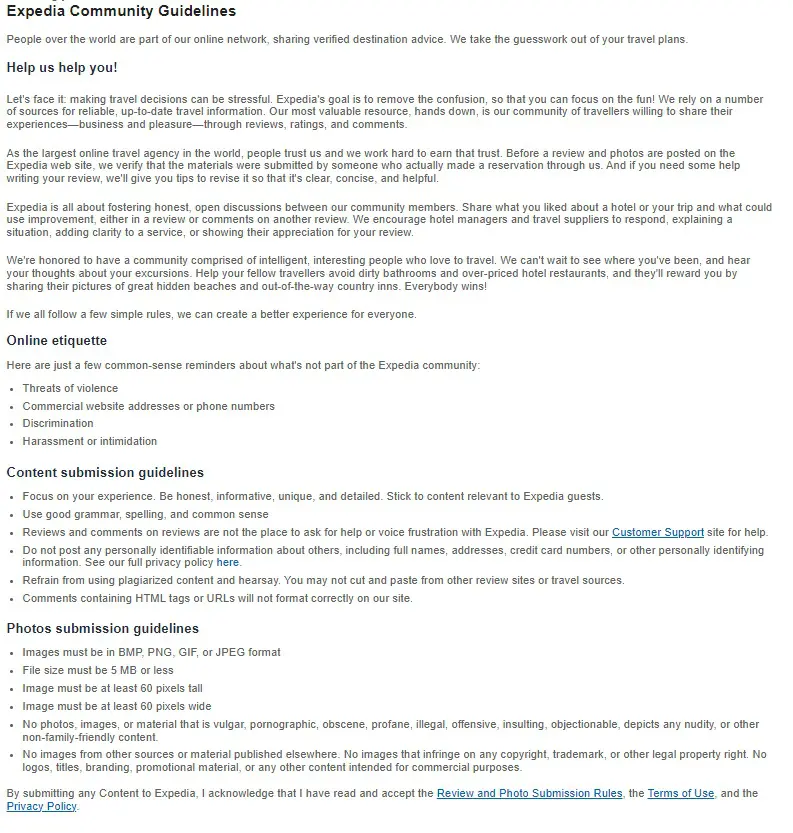
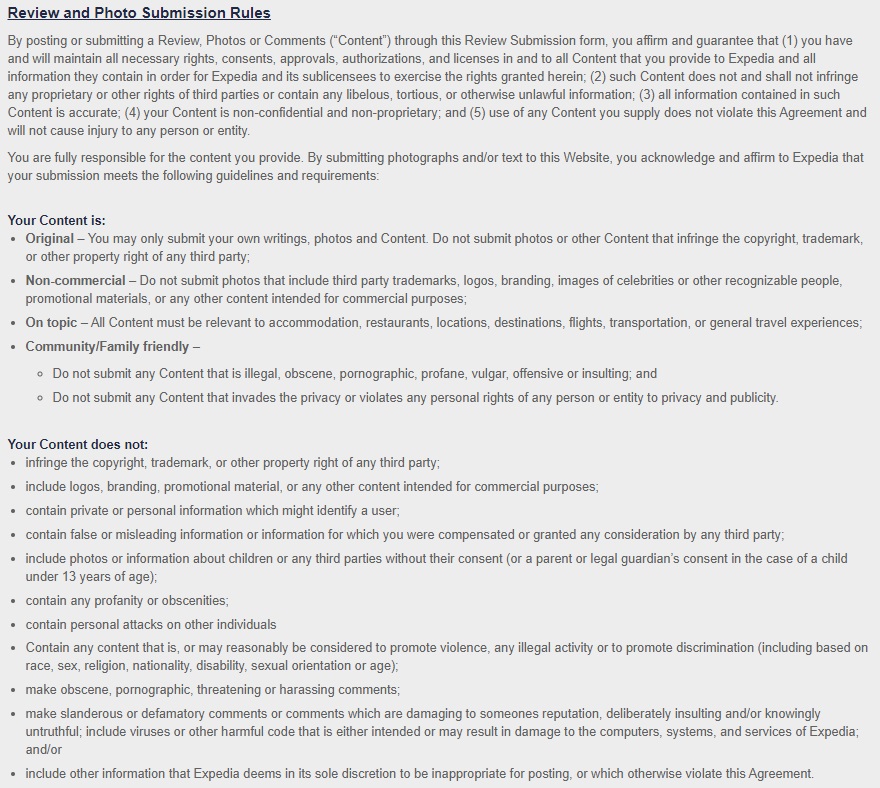
When addressing Expedia reviews and looking for a reason to delete Expedia reviews, it’s important to assess them against Expedia’s community guidelines. Key points include:
- Check Authenticity: Report reviews with false or misleading content about your business, prioritizing accuracy and genuine experiences.
- Identify Conflicts of Interest: Flag reviews suspected from company insiders, competitors, or anyone with a conflict of interest.
- Monitor for Inappropriate Content: Reviews containing offensive, aggressive, or disrespectful content should be reported.
- Ensure First-Hand Experience: Reviews should be based on actual customer experiences; speculative or second-hand accounts don’t follow guidelines.
- Safeguard Privacy: Report any review disclosing private or confidential information.
- Exclude Promotional Content: Reviews serving as advertisements or containing promotional material are against the guidelines.
- Correct Misidentifications: If a review for another business is posted on your page, report it for accuracy.
- Focus on Representative Events: Reviews should reflect the typical customer experience.
Best Practices for Reporting:
- Provide Specific Details. When reporting, include specific reasons why the review violates guidelines.
- Avoid Emotional Responses, Maintain professionalism and objectivity.
- Keep records of the review and your reasons for reporting.
- If necessary, follow up with Expedia for updates on your report.
- It’s essential to maintain professionalism during the reporting process, understanding that reporting does not guarantee removal.
You can review all Expedia’s review and photo guidelines and community guidelines below.
What to Do If You Can’t Remove a Negative Expedia Review
If a bad Expedia review won’t come down, there are still ways to protect your reputation.
Check If Legal Action Makes Sense
If the review includes false claims that could harm your business, legal action might be an option.
Talk to a defamation lawyer. They can tell you if the review meets the legal standard for libel.
Legal Risks to Consider
Suing over a review can make it even more visible due to the “Streisand Effect.”
People may see legal action as an attempt to silence criticism, which could hurt your reputation even more.
Lawsuits are expensive and can take months or even years to resolve.
Even if you win, the damage may already be done.
Try a Reputation Management Service
Reputation management experts can help remove or suppress bad reviews.
They understand how review platforms work and what content violates policies.
Choose a service that only charges for results. Avoid companies that demand payment upfront without a guarantee.
Encourage satisfied employees or customers to leave positive reviews.
A great work environment naturally leads to better feedback.
Share positive testimonials on your website and social media.
Focus on the Big Picture
One bad review won’t ruin your reputation if you have plenty of good ones.
Keep building a strong, positive image so a single negative comment won’t have much impact.
Originally published December 21, 2023.


