


Guaranteed Removals Comprehensive Guide To Remove Yellow Pages Reviews
Welcome to our comprehensive guide on how to remove Yellow Pages reviews, a key component of our content removal and review removal series aimed at assisting individuals and businesses in managing their online reputation.
Yellow Pages used to be the pinnacle of online listings, but has steadily declined as platforms like Google Maps have surged in growth over the past 20 years.
Despite that drastic change, reviews on Yellow Pages can significantly impact your business, with positive feedback enhancing your profile and negative reviews potentially posing challenges. Navigating and managing these reviews on such a significant platform is essential for upholding your business’s online image, not just on Google, but everywhere that your customers leave feedback.
This guide offers clear, step-by-step instructions on evaluating and, if necessary, removing reviews from your Yellow Pages Ratings and Reviews.
Steps to Remove Yellow Pages Reviews
Before diving into the removal process, we recommend following these sequential steps for the best chance of success:
- Try to address the reviewer’s concerns by contacting them directly.
- Identify which of Yellow Pages’ terms the review may violate.
- Use the ‘Report’ or ‘Flag’ feature next to the review on Yellow Pages.
- Provide detailed reasons for the report, including evidence if applicable.
- Follow up with Yellow Pages customer support for unresolved cases.
- In certain cases, consider legal advice if the review is damaging and violates legal standards.
Keep these points in mind during the process
- Yellow Pages reserves the right to remove or edit reviews at their discretion.
- Reviews can only be removed if they violate the platform’s terms and conditions.
- Reporting a review does not automatically lead to its removal.
- Negative reviews are not removed unless they contravene the specified terms.
- Patience is key, as the review handling process may take time.
If you find it challenging to remove a negative review on Yellow Pages, or if you lack the time to manage it, our team of professionals at Yellow Pages Comprehensive Guide is always ready to assist.
Contacting the Reviewer Directly
Addressing negative reviews directly can be a highly effective method, especially when dealing with Yellow Pages Ratings and Reviews. This approach not only aims to solve the issue at hand but also demonstrates your dedication to customer satisfaction. Here are steps to follow:
- Initiate Private Contact: Where possible, reach out to the reviewer privately. While Yellow Pages may not provide direct contact information, you can try responding to their review publicly, inviting them to discuss the matter privately via email or phone.
- Acknowledge and Apologize: Start your communication by acknowledging their experience and apologizing for any inconvenience they might have faced. This step shows empathy and your readiness to address their concerns.
- Understand the Problem: Engage in a conversation to fully understand their issue. Ask clarifying questions to ensure you grasp the specifics of their complaint. This will help in offering a more effective and personalized solution.
- Propose a Resolution: Based on their feedback, propose a solution. This could range from offering a refund, replacement, discount on future services, or a pledge to make necessary improvements. Ensure that your proposed solution directly addresses their concerns.
- Request for Review Modification or Removal: After resolving their issue, you can politely request if they would consider updating or removing their negative review on Yellow Pages. Explain the significance of customer reviews to your business and how their updated feedback can help.
- Learn and Improve: Use this experience as a learning opportunity. Analyze the situation to implement measures that prevent similar issues from occurring in the future.
Direct engagement with dissatisfied customers on Yellow Pages Ratings and Reviews not only can rectify individual issues but also shows other users that you are committed to excellent customer service. This proactive approach can transform a negative experience into a positive one, potentially turning an unhappy reviewer into a loyal customer.
Evaluate Yellow Pages Reviews with Their Guidelines and Terms and Conditions
Here’s how you can effectively use Yellow Pages’s reporting features in line with their policies to remove reviews that violate their policies:
- Check for Authenticity: If a review contains false or misleading information about your business, report it. Yellow Pages values accuracy and expects reviews to be reflective of genuine experiences.
- Identify Conflicts of Interest: Flag any review you suspect is from someone with a conflict of interest, like company insiders or competitors. Yellow Pages’s terms prohibit such biased reviews.
- Inappropriate Content: Report reviews that contain aggressive, offensive, or disrespectful content, including threats, explicit language, or discriminatory remarks. These violate Yellow Pages’s commitment to maintaining respectful interactions.
- First-Hand Experience Requirement: Yellow Pages reviews should be based on actual experiences. Report reviews that are speculative or do not reflect a direct personal account with your business.
- Uphold Privacy: Reviews must not disclose private or confidential information without consent. Any review compromising privacy should be reported in line with Yellow Pages’s guidelines. Reviews must not contain full names, email addresses, or hyperlinks pertaining to a business owner or product manufacturer.
- Avoid Promotional Content: Reviews should not contain promotional materials or advertisements. Yellow Pages restricts content that deviates from genuine customer feedback.
- Misidentification: If a review intended for another business is posted on your profile, report it as ‘for the wrong business’ to maintain the relevance of feedback on your page.
- Non-Representative Events: Yellow Pages aims to capture typical customer experiences. Flag reviews focusing on atypical events if they do not represent the standard experience with your business.
Best Practices for Reporting:
- Thoroughly read the review before reporting it.
- Select the most applicable reason when reporting.
- Understand that reporting a review does not guarantee its removal; Yellow Pages will evaluate the content against their terms.
- Maintain professionalism throughout the process.
You can review all of the Yellow Pages content guidelines on their website.
Report Yellow pages Reviews for Removal
To report a Yellow Pages review, follow these steps:
1. Sign in to Your Yellow Pages Account: Go to the Yellow Pages website and log in with your account details.
2. Access Your Reviews: Navigate to your business dashboard and find the section displaying your Yellow Pages reviews.
3. Find the Review to Delete: Look through your reviews and select the one you wish to report.
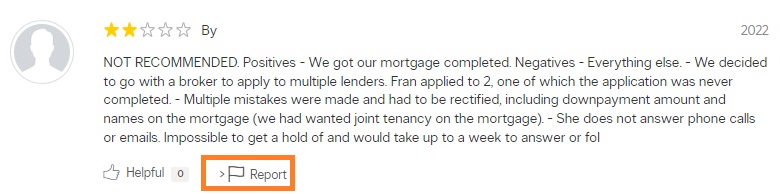
4. Report the Review: Click the ‘Report’ button to flag the review for removal. This is for things like fake yellow pages reviews, reviews that contain offensive language or images, or seem to be posted by a competitor that violate Yellow Pages content guidelines.


5. Enter Details: Provide your email address and the reason for reporting the review as abuse. You will have to choose which review guideline has been violated.
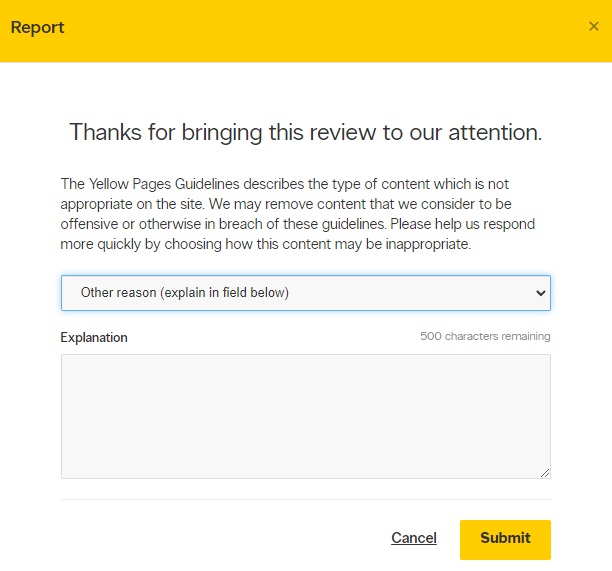
6. Submit Your Report: Click the bright yellow ‘Submit’ button after entering the provided CAPTCHA code.
7. Wait for a Response: After submitting, it’s a waiting game. Yellow Pages will review your report and decide on the review’s removal. It’s recommended to craft a response to the review in case Yellow Pages decides not to remove it.
Yellow Pages will then review your claim and decide whether the review should be removed from your business listing. The process may take a few days.
Escalate Yellow Pages Reviews
If your initial report was denied, follow these steps to escalate the request:
- Review Yellow Pages’ guidelines to understand why the review wasn’t removed and confirm it violates their policies.
- Gather evidence if the review is fake, biased, paid, contains profanity, or is defamatory. Include any communications, transaction records, or other proof.
- Contact Yellow Pages support again via their website, email, or by calling 1-866-794-0889. State that you are escalating your previous report.
- Provide clear details about how the review violates their guidelines and include the evidence you collected.
- Request a deeper investigation or ask for the case to be reviewed by another team member.
- Follow up politely and consistently if you don’t receive a satisfactory response.
- Respond to the review publicly while waiting. A professional reply can reduce its negative impact on your reputation.
If the issue isn’t resolved and the review is seriously harming your business, consider mediation or legal advice. Challenging a review can take time and may not always succeed, so weigh the effort against its actual impact.
Handling Yellow Pages Reviews That Aren’t Removed
If a negative review stays up despite your efforts, there are alternative approaches to consider:
Legal Support
For serious cases, explore legal options if the review is defamatory or illegal. Consult a lawyer to assess your position and the feasibility of action against the reviewer or Yellow Pages. However, legal action can draw unwanted attention, impact your public image, and be costly and time-consuming, with no guaranteed outcome.
Reputation Management
Reputation management services like ours can be another route. Professionals experienced in handling online content can manage removal processes effectively while adhering to platform policies.
Promoting Positive Experiences
Focus on promoting positive experiences to offset negative reviews. Encourage happy customers to leave reviews, build strong relationships, and highlight testimonials and success stories through your communication channels.
When you’re managing negative feedback, adopting a measured and professional strategy is necessary.
Often, it’s more beneficial to focus on enhancing customer relations and promoting positive experiences rather than fixating on a single negative review. This approach not only helps in maintaining a positive image but also contributes to long-term customer satisfaction and loyalty.
Originally published December 19, 2023.


